.png?w=1000&h=743)

For first-time users of coupons on our site.
We will clearly explain how to use a coupon to get a discount.
1. Obtain the coupon code
First, get the coupon code distributed through specific campaigns or promotions.
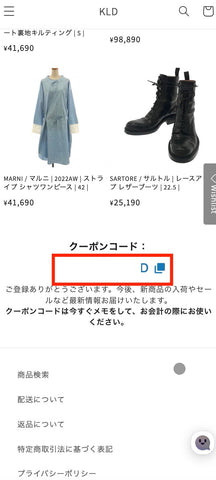
2. Proceed to the checkout screen
Add the product to your cart and proceed to the checkout screen. Here, you will perform the important task of entering the "coupon code."
3. Click on the "View Order Details / Enter Coupon" section
You should see a section at the top of the checkout screen that says "View Order Details / Enter Coupon." Please tap this section to open it.
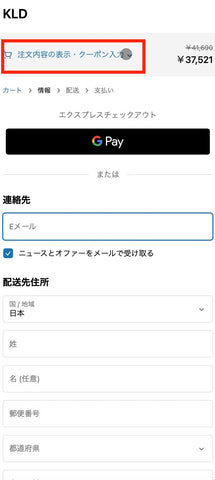
4. Enter the coupon code
In the opened form, there is a section labeled "Coupon Code." Enter the coupon code you obtained earlier here.
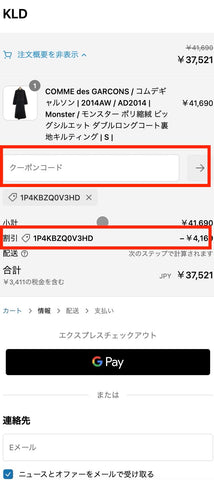
5. Press the "→" button to apply
After entering the code, please tap the "→" button. This will apply the coupon.
Note: If the coupon code is automatically applied when obtained, this step is not necessary. If it is already displayed in the "Discount" section, you do not need to do anything and can proceed with the checkout as is.
6. Confirm the "Discount" section
When the coupon code is correctly applied, the discount amount will be displayed in the "Discount" section. Please check this and proceed with the checkout at the correct amount. 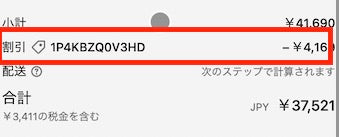
This completes the use of the coupon!
Even for first-timers, you can easily receive a discount by following these steps. Enjoy shopping at a great price!